Banking · Excel
Sumaya Mateen
Lead AnalystPakistan
Data analyst specialising in cohort analysis, financial reporting, and executive dashboards, using SQL, Power BI, and Excel.
Looking for: I'm looking for a data analyst role where rigorous SQL work and stakeholder-facing reporting sit side by side.
Scores reflect independent, automated grading of simulated business tasks completed on DataSimHQ.
- Graded projects
- 236
- Average best score
- 91/100
- Career level
- Lead Analyst
- Core tool stack
- Power BI (86) · SQL (84) · Excel (60) · email (6)
About
Working through retail and financial services scenarios, I have built cohort revenue retention matrices, year-over-year financial summaries, and fraud-churn overlap analyses entirely in SQL, applying multi-signal logic, point-in-time filtering, and division-safe aggregation patterns. Each submission was independently graded against a model answer.
On the Power BI side, I have delivered multi-page executive dashboards with 80-plus DAX measures, custom tooltip pages, field parameters, and consistent branded layouts across eight report pages. The focus throughout has been producing output a board or senior stakeholder can act on directly, without further cleaning or explanation.
Skills
SQL
- CTE chaining in PostgreSQL
- Cohort age calculation with DATE_TRUNC and EXTRACT
- Point-in-time balance filtering
- NULLIF for division-by-zero protection
- COALESCE for NULL-safe aggregation
- COUNT FILTER syntax in PostgreSQL
- CROSS JOIN single-row assembly for wide-format output
- Cents-to-currency unit conversion in SQL
Power BI and DAX
- DAX measure authoring (churn, fraud, loan, quartile, health status)
- Power BI field parameters and SELECTEDVALUE
- Custom tooltip pages in Power BI
- Page navigator visuals and bookmark configuration in Power BI
Highlights
- Built a complete fraud intelligence suite across wire transaction flag rates, industry-level fraud rates, and YoY case-type comparisons, demonstrating the ability to surface risk patterns at multiple levels of granularity for a commercial bank serving SMBs.
- Mapped the full churn lifecycle for a commercial banking portfolio, from total churned volume and monthly trajectory through churn by industry, risk tier, and banker, exposing where retention pressure was highest and why.
- Constructed demand and stockout dashboards in Power BI for a retail sports context, combining DAX-driven KPI measures, regional anomaly detection, and markdown decision support into a war-room-style reporting layer.
- Ran pre-tournament to post-tournament analysis end-to-end, SKU inventory tiering in SQL, demand forecasting in Excel, opening-day sales breakdowns, and breakout player detection, demonstrating the ability to own an analytical workstream from planning through performance review.
Featured work
Banking · SQL
Fraud and churn overlap analysis for 2024 customer cohort
Independent grading: 95/100(verify, opens in a new tab)
Problem
Dana Park at Nexus Financial (simulated retail bank) wanted to test whether customers who experienced fraud were more likely to churn than those who did not. The task required calculating customer counts and churn rates for two separate cohorts, fraud-affected and fraud-free, scoped to customers who onboarded in 2024.
What I did
Churn detection was built as a layered CASE expression combining three independent signals: a non-null churn_date on the customer record, a matching event in the customer_lifecycle table with type churned or closed, and the fallback condition of all accounts being closed with none remaining active. This multi-signal approach avoids undercounting churn when any single field is inconsistently populated. Scoping to 2024 onboarders was applied via EXTRACT(YEAR FROM onboarding_date) = 2024 in the fraud_status CTE. A LEFT JOIN on fraud_cases with a COUNT(case_id) greater than zero check cleanly separates the two cohorts without dropping any customers.
Finding
The query produced a two-cohort comparison with both churn rates surfaced in a single result set, which the reviewer confirmed was structurally correct and matched the required output format.
Outcome
Dana received a direct, side-by-side comparison of fraud and non-fraud churn rates for the 2024 cohort, giving the team a quantified starting point for evaluating whether the two customer risk stories are linked.
Next step
Segmenting the fraud cohort by fraud case type or loss amount band would show whether it is the occurrence of fraud or its severity that drives the higher churn signal.
- CTE chaining in PostgreSQL
- COUNT FILTER syntax in PostgreSQL
- COALESCE for NULL-safe aggregation
Retail · SQL
Cohort revenue retention matrix for board reporting
Independent grading: 95/100(verify, opens in a new tab)
Problem
The head of analytics at Meridian Retail (simulated retailer) needed to show the board how customer lifetime value evolves after acquisition. The specific question was: for customers acquired in a given quarter, what percentage of their first-quarter revenue is retained in each subsequent quarter? The matrix needed to cover eight quarters and exclude cancelled, returned, and refunded orders.
What I did
Status filtering happens in the first CTE, before any aggregation, so cancelled, returned, and refunded orders never enter the cohort calculations. Cohort assignment uses DATE_TRUNC on the customer's first order date rather than the order date being analysed, which keeps each customer anchored to their true acquisition quarter. The cohort age formula, year-difference multiplied by four plus quarter-difference, handles year boundaries correctly, so a customer acquired in Q4 2022 who orders in Q1 2023 receives an age of one, not a negative value. NULLIF wraps the Q0 revenue denominator to guard against a division-by-zero error appearing in a board presentation.
Finding
The query produced a structurally clean matrix where Q0 retention is consistently 100% and subsequent quarters fall within a plausible range, with no anomalies flagged by the reviewer.
Outcome
The board received a single result set with revenue expressed in millions of naira and retention percentages rounded to two decimal places, ready for direct inclusion in a slide deck.
cohort_base AS (
 SELECT
 bo.customer_id,
 bo.revenue_naira,
 DATE_TRUNC('quarter', fo.first_order_date) AS cohort_quarter,
 DATE_TRUNC('quarter', bo.created_at) AS order_quarter,
 (
 (EXTRACT(YEAR FROM DATE_TRUNC('quarter', bo.created_at)) -
 EXTRACT(YEAR FROM DATE_TRUNC('quarter', fo.first_order_date))) * 4
 +
 (EXTRACT(QUARTER FROM DATE_TRUNC('quarter', bo.created_at)) -
 EXTRACT(QUARTER FROM DATE_TRUNC('quarter', fo.first_order_date)))
 ) AS cohort_age
 FROM base_orders bo
 JOIN first_order fo
 ON bo.customer_id = fo.customer_id
)
This CTE anchors every order to the customer's acquisition quarter and computes cohort age in quarters, handling year-boundary arithmetic so that Q4-to-Q1 transitions produce a positive age of one rather than a negative value.
Next step
A useful next step would be to break retention by product category, to see whether certain category buyers drive the stronger cohorts in that 40-83% range.
- CTE chaining for multi-step SQL pipelines
- Cohort age calculation with DATE_TRUNC and EXTRACT
- NULLIF and COALESCE for division-by-zero and NULL defence
- Cents-to-currency unit conversion in SQL
Banking · SQL
Year-over-year financial summary for board pack
Independent grading: 91/100(verify, opens in a new tab)
Problem
David Kim at Nexus Financial (simulated retail bank) needed a single wide-format result set comparing 2023 and 2024 across five metrics: total deposits, loan originations, transaction volume, fraud loss, and customer churn. Each metric required an absolute change and a percentage change column, all in one row.
What I did
Deposits were calculated using point-in-time logic, filtering accounts that opened before year-end and had not yet closed by that date, which captures an end-of-year balance snapshot rather than a period sum. Each of the five metrics was isolated in its own CTE returning a single row, then all ten single-row CTEs were assembled via CROSS JOIN, which is safe here precisely because each CTE produces exactly one row. NULLIF wraps every percentage change denominator to prevent division-by-zero, and COALESCE wraps every aggregate to replace nulls from empty date ranges with zero.
Finding
All five metrics were present with 2023 and 2024 values, absolute change, and percentage change, and the reviewer confirmed the wide-format output was correct and board-ready.
Outcome
David received a single-row result set covering every required metric, formatted for direct inclusion in a board pack without additional pivoting or manual calculation.
deposits_2023 AS (
 SELECT COALESCE(ROUND(SUM(a.current_balance) / 100.0, 2), 0) AS total_deposits
 FROM nexus_banking.accounts a
 WHERE a.status = 'active'
 AND a.opened_date < '2024-01-01'
 AND (a.closed_date IS NULL OR a.closed_date >= '2024-01-01')
),
This CTE captures the end-of-2023 deposit balance by requiring accounts to have opened before 2024 and not yet closed by that date, converting cents to dollars and guarding against a null result with COALESCE.
Next step
Adding a branch-level breakdown of the same five metrics would let David identify which locations are driving the aggregate movements rather than reading only the institution-wide totals.
- Point-in-time balance filtering
- CROSS JOIN single-row assembly for wide-format output
- NULLIF for division-by-zero protection
- COALESCE for NULL-safe aggregation
- Cents-to-currency unit conversion in SQL
- CTE chaining in PostgreSQL
Banking · Power BI
Eight-page executive dashboard with DAX measure library and tooltip pages
Independent grading: 92/100(verify, opens in a new tab)
Problem
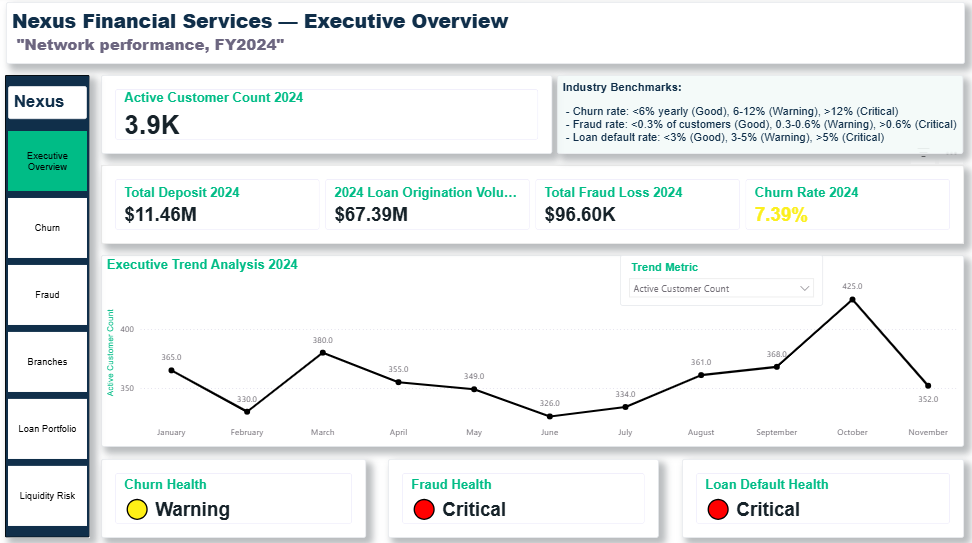
David Kim at Nexus Financial (simulated retail bank) required a board-grade Power BI report covering the full business: onboarding, executive overview, churn, fraud, branches, loan portfolio, and liquidity risk. The file had to be openable and fully navigable by David himself, with consistent theming, working bookmarks, and no raw measure names visible as labels.
What I did
The report was built across eight pages, exceeding the five-page minimum, with a pageNavigator visual placed on every substantive page so click-through navigation works without returning to a home screen. A dedicated Tooltip Page was constructed using six card visuals, the correct pattern for surfacing at-a-glance KPIs when a user hovers over key visuals elsewhere in the report. The DAX measure library reaches 81 measures spanning churn, fraud, loans, branches, deposits, quartile banding, and health status signals. A field parameter table with a SELECTEDVALUE measure was wired to the Executive Overview page to satisfy the interactive parameter requirement.
Finding
The reviewer confirmed that all eight pages were delivered, page navigation was live across every page, the tooltip page followed the correct card-visual pattern, and no raw column references appeared as labels.
Outcome
David received a zipped PBIP file he could open and click through independently, with a complete branded layout and an 81-measure library covering every domain in the brief.
Next step
Row-level security is not yet configured on this report, so adding RLS roles scoped by branch or region would be the logical next step before sharing the file beyond the core finance team.
- DAX measure authoring (churn, fraud, loan, quartile, health status)
- Power BI field parameters and SELECTEDVALUE
- Custom tooltip pages in Power BI
- Page navigator visuals and bookmark configuration in Power BI
Additional projects
Customer Analytics
- Customer lifetime value analysis by risk tier · SQL · 92/100
- Complaints breakdown and hub analysis · Excel · 92/100
- Complaints data executive briefing · Email · 92/100
- Churn rate doubling stress scenario by industry · SQL · 88/100
- Complaint volume baseline for board reporting · SQL · 97/100
Dashboard Development
- Board pack final formatting and delivery · Excel · 72/100
- Hub delivery performance dashboard page · Power BI · 100/100
- Executive summary refresh with final board pack findings · Excel · 88/100
- Customer complaints overview dashboard · Power BI · 95/100
- Self-service operations performance report · Power BI · 88/100
- Board pack final polish and shipment · Excel · 52/100
- Raw vs corrected failure rate executive cards · Power BI · 95/100
- Recurring weight leakage model for finance · Power BI · 92/100
- Executive board pack performance page · Power BI · 81/100
- Executive summary workbook with four corrected operational metrics · Excel · 91/100
- Loan portfolio health page with cohort retention table and composition visuals · Power BI · 95/100
Data Analysis
- Fraud findings summary for executive review · Excel · 88/100
- October 2023 order volume audit · SQL · 100/100
- Combined risk exposure ranking by industry · SQL · 92/100
Data Modeling
- Clean shipment transit data model · Power BI · 88/100
- Live PostgreSQL connections via Power Query · Excel · 95/100
- Board level corrected operations model · Power BI · 82/100
Data Quality
- Delivery attempt cap compliance audit · SQL · 98/100
- Reported vs true COD exposure model · Power BI · 95/100
- Deduplicated customer count baseline · SQL · 100/100
- Phantom COD shipment flagging and exposure cleanup · Excel · 95/100
- Delivery attempt anomaly trend visualization · Power BI · 95/100
- Data methodology memo for board pack appendix · Email · 91/100
- Impossible shipment records identification and address audit · Excel · 92/100
- Delivery attempt policy breach audit · Excel · 95/100
- COD field integrity audit · SQL · 98/100
Financial Reporting
- Churn and fraud summary report pages · Excel · 91/100
- Verified COD exposure position for sign-off · SQL · 96/100
- Board pack executive summary page · Excel · 91/100
- Fraud loss doubling stress scenario by industry · SQL · 92/100
- Loan portfolio health report page · Excel · 92/100
- Recoverable revenue rescoping to statutory 12-month window · Excel · 92/100
- Deposit base composition table for liquidity stress reporting · Excel · 92/100
- Branch profit and loss report page · Excel · 91/100
- COD audit committee position sheet · Excel · 92/100
- Revenue recovery scenario model for board · Excel · 92/100
- Forward outlook refresh with stress test conclusions · Excel · 91/100
- 2025 forward outlook scenario model · Excel · 92/100
- Loan portfolio recession-grade default stress test · SQL · 95/100
- Shipment weight under-declaration exposure sizing · SQL · 92/100
- Liquidity stress test sheet · Excel · 88/100
- True COD exposure summary to financial controller and legal · Email · 94/100
- Three scenario liquidity stress model · Excel · 92/100
- Regional liquidity coverage table for regulatory reporting · Excel · 88/100
- Weight under-declaration exposure analysis · Excel · 92/100
- Recoverable revenue findings summary to financial controller · Email · 91/100
- Recoverable revenue leakage within legal window · SQL · 92/100
- Regional liquidity coverage ratio for regulatory reporting · SQL · 92/100
- Regulatory readiness board summary · SQL · 88/100
- Audit committee COD exposure breakdown by status · Power BI · 70/100
- Recoverable leakage recovery page for legal review · Power BI · 68/100
Operations Analytics
- Hub-level SLA performance summary for board reporting · Excel · 92/100
- Hub performance scorecard with complaint integration · Excel · 95/100
- Engagement closing summary for chief operating officer · Email · 94/100
- Hub underperformance ranking analysis · SQL · 97/100
- Failure rate finding communicated to customer experience head · Email · 92/100
- Corrected delivery failure rate calculation · SQL · 95/100
- Corrected shipment failure rate calculation · Excel · 95/100
Security & Governance
- Hub manager row-level security implementation · Power BI · 95/100